A ghost voice is defined by what is missing. A living speaker has weight, a place in the room and one clear source. Take those three away and the ear stops hearing a person and starts hearing a presence. Below: why that works, how to perform it, and how to build the ghost voice effect by hand or in a few clicks.
What makes a voice sound like a ghost
Distance. The ear judges distance largely from the balance between direct sound and reflections. A close voice is almost all direct sound; a voice across a hall is mostly room. A ghostly voice effect sits past the point where the reflections are louder than the speaker.
Air. A ghost voice is mostly breath noise and soft consonants with little tone underneath: speech without effort, as if nothing is pushing the air.
A thin low end. Cut the chest and the ghost voice loses its body, literally.
A long tail. Reverb that keeps going for seconds after the line ends, so each word hangs in the room after the speaker has gone.
Slight detune. A second copy a fraction of a semitone off and a few tens of milliseconds late. Too close to be a second speaker, too far apart to be the same one: the ear hears a shimmer.
Reversed swells. A reverb that grows into a word instead of decaying after it. A ghost voice whose echo comes first seems to run backwards through time.
The Ghost effect in AI Scary Voice is a ghostly voice effect that builds most of these cues at once. Its real settings at three strengths:
- Stage
- High-pass (removes the body)
- Ghost 30%
- 370 Hz
- Ghost 60%
- 460 Hz
- Ghost 100%
- 580 Hz
- Stage
- Low-pass (softens the edge)
- Ghost 30%
- 7 kHz
- Ghost 60%
- 7 kHz
- Ghost 100%
- 7 kHz
- Stage
- Dry voice level
- Ghost 30%
- 0.475
- Ghost 60%
- 0.40
- Ghost 100%
- 0.30
- Stage
- Reverb, 4.5 s tail, wet level
- Ghost 30%
- 0.705
- Ghost 60%
- 0.81
- Ghost 100%
- 0.95
- Stage
- Detuned double: 1.2% fast, 45 ms late, level
- Ghost 30%
- 0.165
- Ghost 60%
- 0.21
- Ghost 100%
- 0.27
- Stage
- Overall speed
- Ghost 30%
- 0.988×, about −0.2 semitones
- Ghost 60%
- 0.976×, about −0.4 semitones
- Ghost 100%
- 0.96×, about −0.7 semitones
Hear the voice move away
At 30% Banshee is in the next room. At 60% the reverb overtakes her and the double trails half a step behind, a fainter second Banshee. At 100% only a thin edge of dry voice sits on the tail. The Ghost effect leaves out the reversed swell; add it in an editor, as shown below.
The preset changes the kind of spirit. Banshee climbs from a whisper to a scream, so it gives a ghost voice for a vengeful haunting or a jump scare. Whisperer sounds frightened, as if the dead were scared of what they saw. Matron, soft and cold, makes a ghost voice for the one who still sings the children to sleep.
Performing a ghost voice
Processing cannot add breath that was never recorded, so a ghost voice starts with the take.
- Breathy, not forced. Let more air than tone through, at a soft speaking level. A full-force whisper turns harsh after a high-pass; a relaxed, airy voice survives it.
- Slow and level. Stretch the vowels, let line endings fall or stay flat.
- Start on the exhale. Begin words at the very end of a sigh so the first sound is air.
- Leave gaps. The pauses you leave become the space the reverb fills.
- Stay a little back from the mic. Too close adds boomy bass and mouth clicks the effect then has to fight.
Lines written for a ghost voice:
The kettle is still warm. I only just left the room.
Say my name the way you used to. I have forgotten how it sounds.
Thirteen stairs. There are only thirteen while you are watching.
Build the ghost voice effect in any editor
The ghost voice chain runs in the same order in every program:
- High-pass the clean take somewhere between 300 and 600 Hz. Higher is thinner.
- Low-pass gently around 7 kHz to soften hiss and the close-mic edge.
- Duplicate the track. Raise the copy about a fifth of a semitone (roughly 20 cents), slide it about 45 ms later and set it 11 to 18 dB below the original.
- Reverb both: a long tail of 4 seconds or more, wet level above dry, its low end trimmed so it doesn’t boom.
- Reversed swell, if you want one: reverse a copy, add reverb, reverse it back and place it so the swell ends where the first word begins.
- Slow it slightly. A few percent slower lowers pitch and pace together, enough to make words feel heavy.
- Limit the result so the tail never clips.
How to make a ghost voice in Audacity
Menu and control names below come from the Audacity manual and Audacity’s own reverse-reverb walkthrough.
- Select the voice and apply Effect › EQ and Filters › High-Pass Filter. Set Frequency around 450 Hz and choose a steeper Roll-off.
- Apply Effect › EQ and Filters › Low-Pass Filter at about 7,000 Hz.
- Press Ctrl+D to duplicate the track. On the copy, apply Effect › Pitch and Tempo › Change Pitch with a Percent Change of about 1.2, drag the copy about 45 ms to the right and lower its gain by roughly 12 dB.
- On each track, apply Effect › Delay and Reverb › Reverb with a large Room Size, high Reverberance, Wet Gain above Dry Gain, and Tone Low below 100% (the manual says this reduces the reverb’s low frequencies).
- For the swell, duplicate the original again and apply Effect › Special › Reverse (older manuals list it directly under Effect). Add Reverb with Wet Only ticked, then Reverse once more. Slide it so the swell ends as the first word starts, and delete the rest.
- Optional: select all the tracks and apply Effect › Pitch and Tempo › Change Speed and Pitch with a Speed Multiplier of about 0.97 for the slight sink.
The same ghost voice chain works in Premiere Pro, DaVinci Resolve or any DAW; scary voice effects, explained maps each stage to Premiere’s effect names.
How to make a ghost voice in the studio
- Open the ghost voice generator. Banshee and the Ghost effect are preselected. For a frightened, breath-first ghost voice, switch to Whisperer.
- Type the line. Every visitor gets 3 free generations a day of up to 300 characters without signing up, and previewing any voice through any effect is free.
- Start Ghost around 60% and move the slider until the ghost voice sits at the right distance. Effects run in your browser, so changes never regenerate the voice or cost anything.
- Signed in, the Cinematic engine reads tags such as
[whispers]and[sighs]. Put one at the start so the line begins as breath. - Download the WAV with Ghost baked in, or the original MP3 to add your own reversed swell. (The studio’s Reverse effect flips the whole clip into backwards speech, a different trick.)
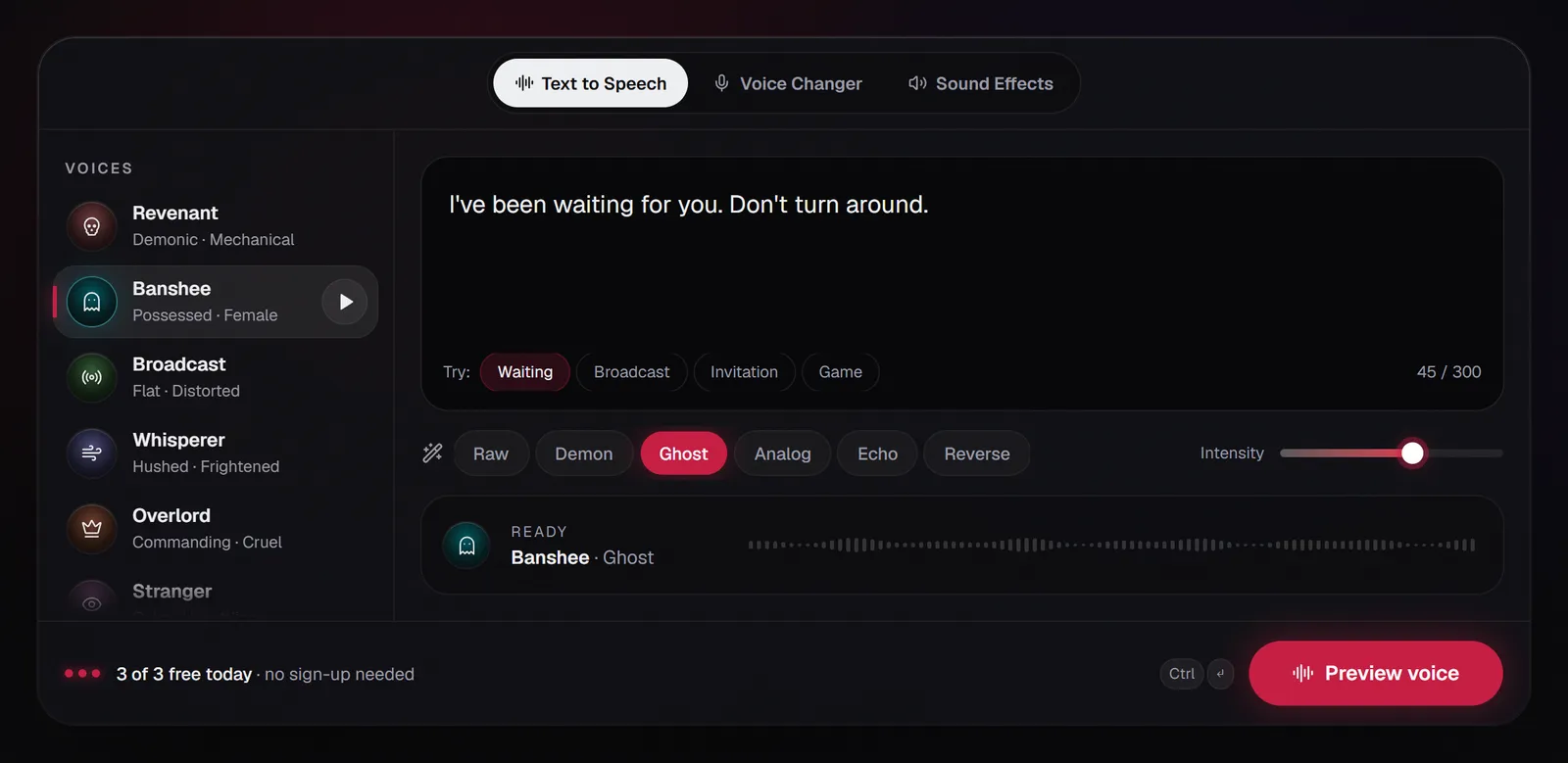
To use your own breathy take, open the Voice changer tab: record up to 60 seconds or upload up to 3 minutes, choose Ghost and download your ghost voice as a WAV. It all happens in your browser; nothing is uploaded. For whispers that stay close and creepy rather than far away, the whisper voice generator starts Whisperer on a lighter Ghost setting. For the opposite, heavy and close, see how to make a monster voice.
FAQ
How do you make a ghost voice in Audacity?
High-pass around 450 Hz, low-pass near 7 kHz, add a duplicate raised about 1.2% and moved 45 ms late, then a long Reverb with Wet Gain above Dry Gain. The Audacity steps above list every menu in the ghost voice chain.
How do you make a voice sound far away?
Lower the direct sound and raise the reflections, so there is more room than voice. Rolling off some lows and highs helps, and a quieter delivery sells it. Ghost at 30% puts a voice about one room away; past 60% the reverb takes over and it reads as a ghost voice.
How do you make vocals sound ghostly?
A sung ghost voice keeps its pitch: skip the slowdown, use the detuned double for shimmer and add reversed-reverb swells into the first word of each phrase. A longer Pre-delay on the reverb keeps the lyric clear before the tail arrives.
How do you make a ghost sound?
If you mean a sound effect rather than a voice, use the Sound effects tab. Describe the sound in up to 300 characters, for example a faint moan drifting down an empty stairwell, and switch on Seamless loop for ambience. It shares the 3 free daily generations and returns up to 2 takes; download the original MP3 for a clean loop. The scary sound effects generator opens that tab directly.
Is whispering bad for your voice?
It can strain it: the NIDCD lists whispering alongside screaming as an extreme to avoid. Keep whispered sessions short and rest if you get hoarse.
Can I make my own voice sound like a ghost?
Yes. Record or upload a clip in the Voice changer, choose Ghost and download a WAV. Your ghost voice is processed free in your browser, on recordings rather than live calls.